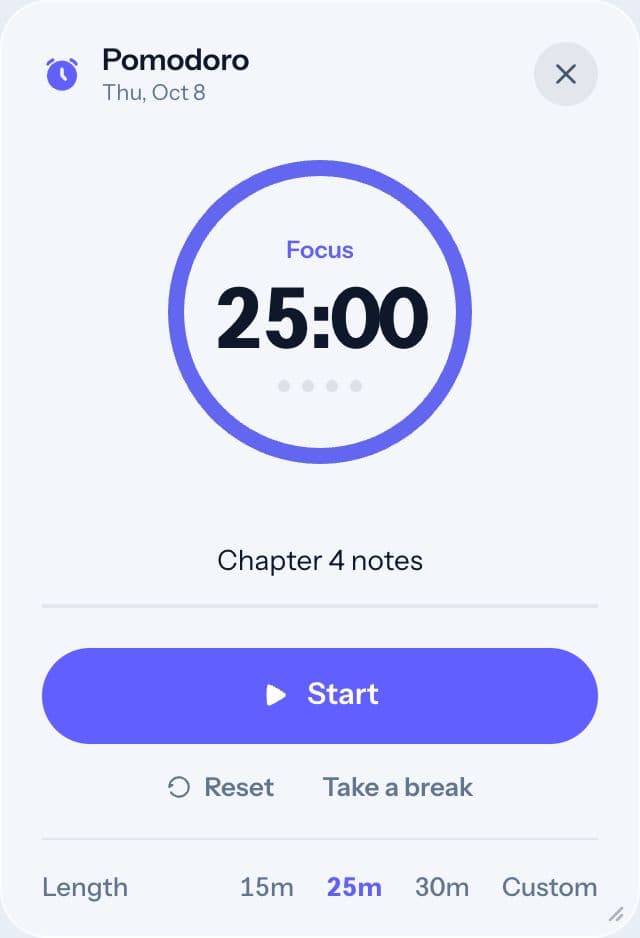
Spacial's timer follows the Pomodoro technique: work for a set time, then take a short break, and repeat. Each work stretch is called a round. New to the method? Start with The Pomodoro technique, explained.
Starting a round
From the home screen, type what you're focusing on (optional) and press Start. You can also open Timer from the dock and press Start there.
Choosing a length
Rounds are 25 minutes by default, followed by a 5-minute break. Open Timer from the dock and pick a length under Length:
- 15 minutes: good for hard-to-start tasks or short attention days.
- 25 minutes: the classic Pomodoro.
- 30 minutes: a little more room for deep work.
- Custom: type any number of minutes.
While the timer runs
- Pause stops the clock. Press Resume to continue.
- Take a break ends the round early and starts your break.
- End session stops for now and shows a short summary of what you did.
When a round finishes on its own, Spacial plays a chime and starts the break. The dots under the time show how many rounds you've done.
How rounds are counted
Each round is saved with its label and length, and feeds your Insights. Sign in to keep this history.
Tips
- Take the breaks. They keep you going for longer.
- Lower the length on hard days. A 15-minute round you start beats a 25-minute round you avoid.
- Write the next step in the label, not the whole goal: "Outline section 2", not "Essay".